Introduction
The Custom QR Code Generator plugin for WordPress is a useful tool that allows users to create QR codes for their website or specific content. With this plugin, users can generate QR codes for various purposes, such as sharing links, promoting products, or providing website information.
Features
- Customizable QR Code Designs
– Adjust color schemes, patterns, and shapes to match your branding or personal style.
– Add logos or images to the center of QR codes for a personalized touch. - Dynamic QR Codes
– Create QR codes with URLs that can be Editable after creation, allowing for content changes without generating a new code. - High-Resolution Output
– Export QR codes in various high-resolution formats, including PNG, JPG, PDF, suitable for print and digital use. - Analytics and Tracking
– Monitor QR code scans with built-in analytics, including location, to measure engagement and effectiveness. - Multiple QR code generation
– Create multiple QR codes at once for bulk use, such as for inventory management or marketing campaigns. - User-Friendly Interface
– Simple and intuitive design for easy navigation and quick QR code generation.
– Preview functionality to see how the QR code will look before finalizing. - Advanced Customization Options
– Control the error correction level and the data capacity of the QR codes to balance between code size and readability. - Integration with Other Tools
– Seamless integration with popular platforms and tools, such as CRM systems, email marketing services, or website builders. - Accessibility Features
– Options for creating QR codes that are accessible to visually impaired users, including high-contrast colors and large sizes. - Localization Support
– Offer multilingual support for different languages and regions to cater to a global audience. - Regular Updates and Support
– Provide ongoing updates for new features and improvements.
– Offer customer support and detailed documentation to assist users. - Security Features
– Password protection for QR codes that link to sensitive or private information. - Import/Export Feature
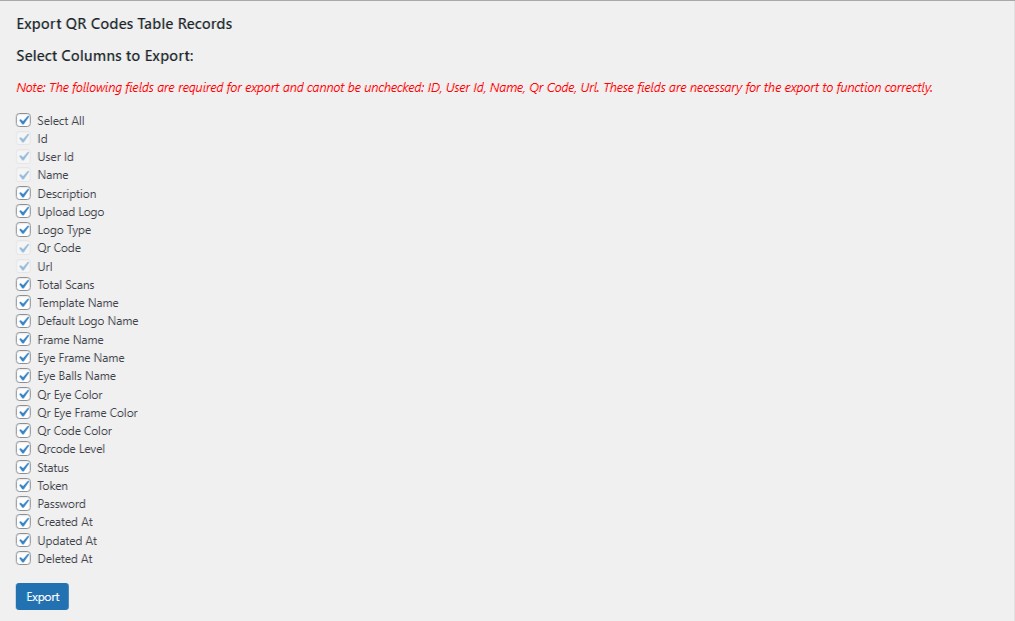
– Introduced new functionality to export/import QR code records, allowing for the selection of specific fields during the export process.
Best Used For
- Sharing Website Links: QR codes that direct users to specific URLs or landing pages.
- Product Information: QR codes used for product details or inventory management.
- Event Details: Codes that provide information or tickets for events.
- Payment Information: Codes used for making payments or donations.
Plugin Install
- Installing the plugin is similar to installing any other WordPress plugin. Start by logging into your WordPress site and navigating to Plugins > Add New.
- On the Install Plugins page, click on the Upload option in the top navigation, and then select Browse.
- Locate the downloaded plugin zip file on your computer and upload it. Remember to unzip the file first to access the plugin zip file.
- Click on Install Now.
- Wait for WordPress to finish uploading the file. Once done, click on Activate Plugin.
- You should now see a message at the top of the window indicating that the plugin has been activated.
About Plugin
1. Qr Code Generation Form
Change the default value for all fields.
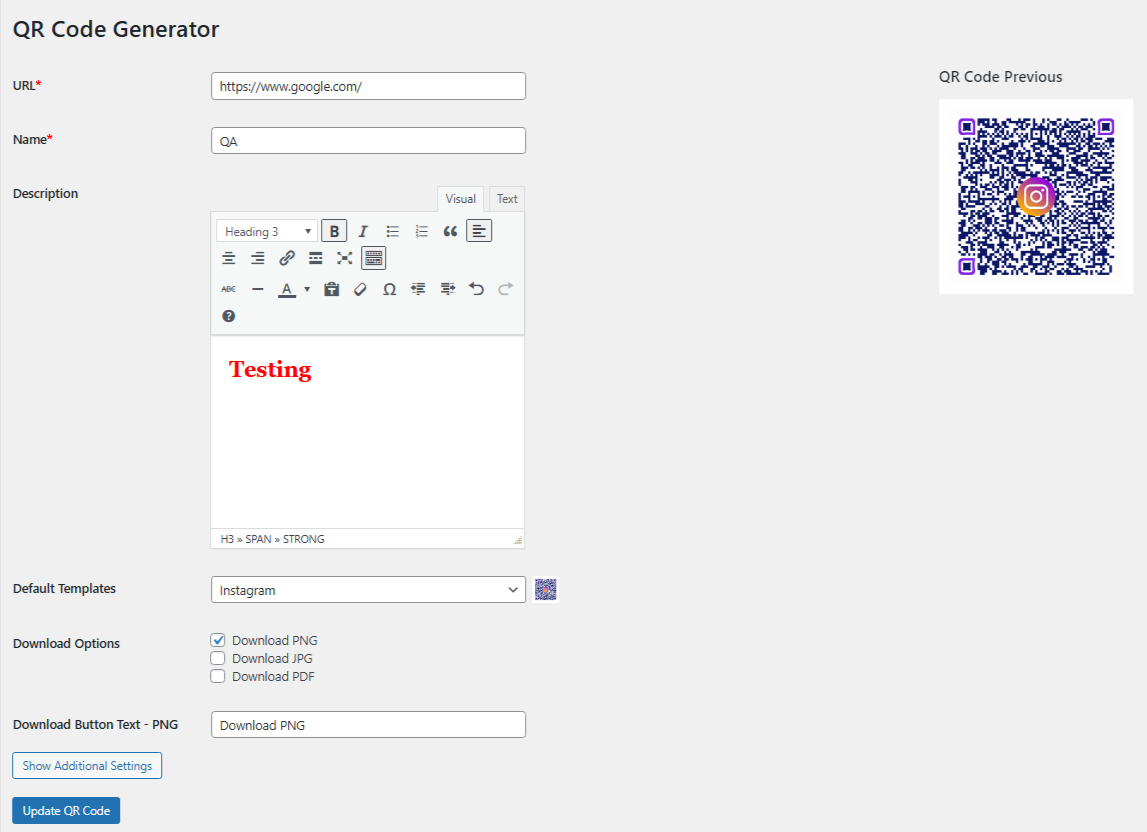
URL :- Enter the web address you want the QR code to direct to. This is the destination the QR code will link to when scanned.
Name :- Provide a name or title for the QR code. This helps you identify and manage your QR codes later.
Description :- Add a brief description or notes about the QR code. This can include information about its purpose or any other relevant details.
Default Templates :– Choose a pre-designed template to customize the appearance of your QR code. Default templates offer various styles and designs to enhance the visual appeal of your QR code.
Download Options :– Select your preferred format to download the file. You can choose from PNG for high-quality images with transparency, JPG for standard image resolution, or PDF for a scalable, print-friendly document format. These options can be customized based on your needs.
2. Qr Code Additional Settings
Change the default value for all fields.
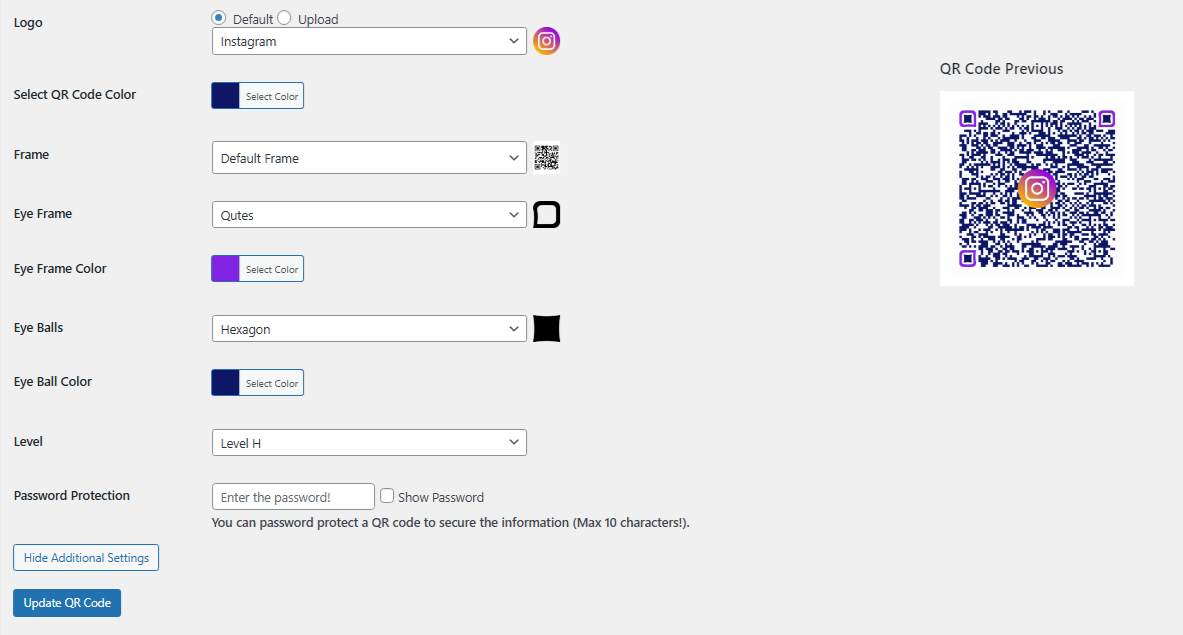
Logo :- Choose to use the default logo image or upload a new one to customize your QR code.
QR Code Color :- Choose the color scheme for your QR code.
Frame :- Choose a frame style to enhance the appearance of your QR code.
Eye Frame :- Select the design for the frames around the QR code’s eyes (the square patterns in the corners).
Eye Frame Color :- Choose the color for the frames around the QR code’s eyes.
Eye Balls :- Pick the style for the circular centers of the QR code’s eyes.
Eye Ball Color :- Choose the color for the eye balls (the circular centers) in the QR code.
QR Code Level :- Choose the error correction level for your QR code to determine its resilience to damage or distortion.
Password Protection :- Implementing Password Protection for Enhanced Safety.
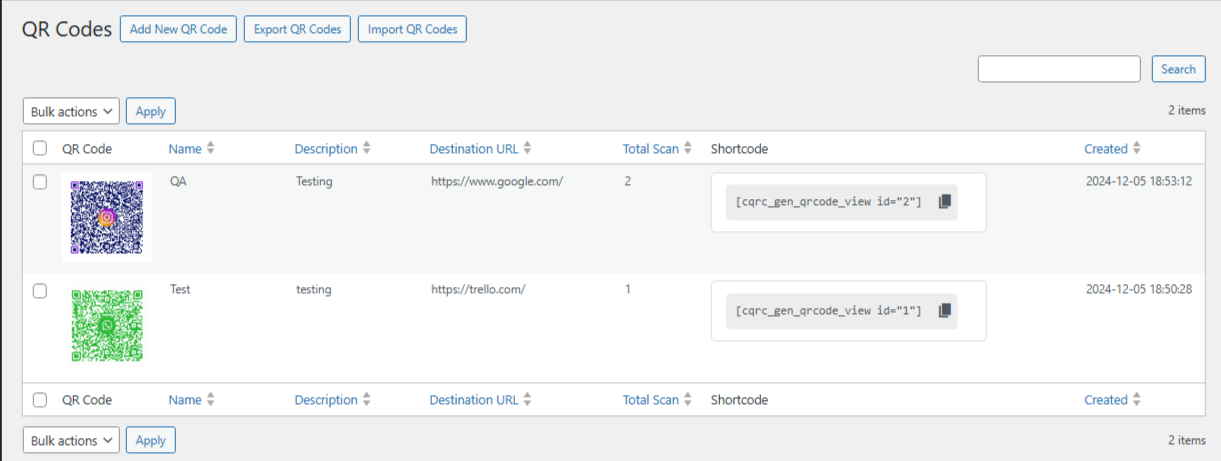
3. Admin Interface: Generated QR Code Backend Listing
The plugin provides a comprehensive admin interface where users can view a list of all generated QR codes.
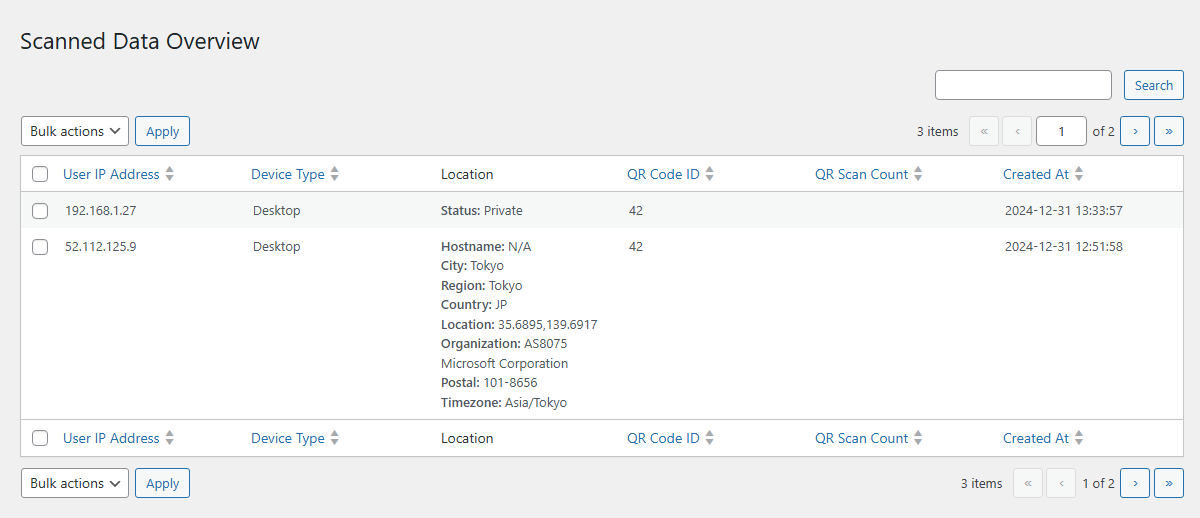
4. Admin Interface: All Scanned Records Backend Listing
The plugin provides a comprehensive admin interface where users can view a list of all scanned QR codes with the user details.
5. Admin Interface: Export QR Codes Feature with Fields Selection
Effortlessly export QR codes with customizable field selection for tailored data management.
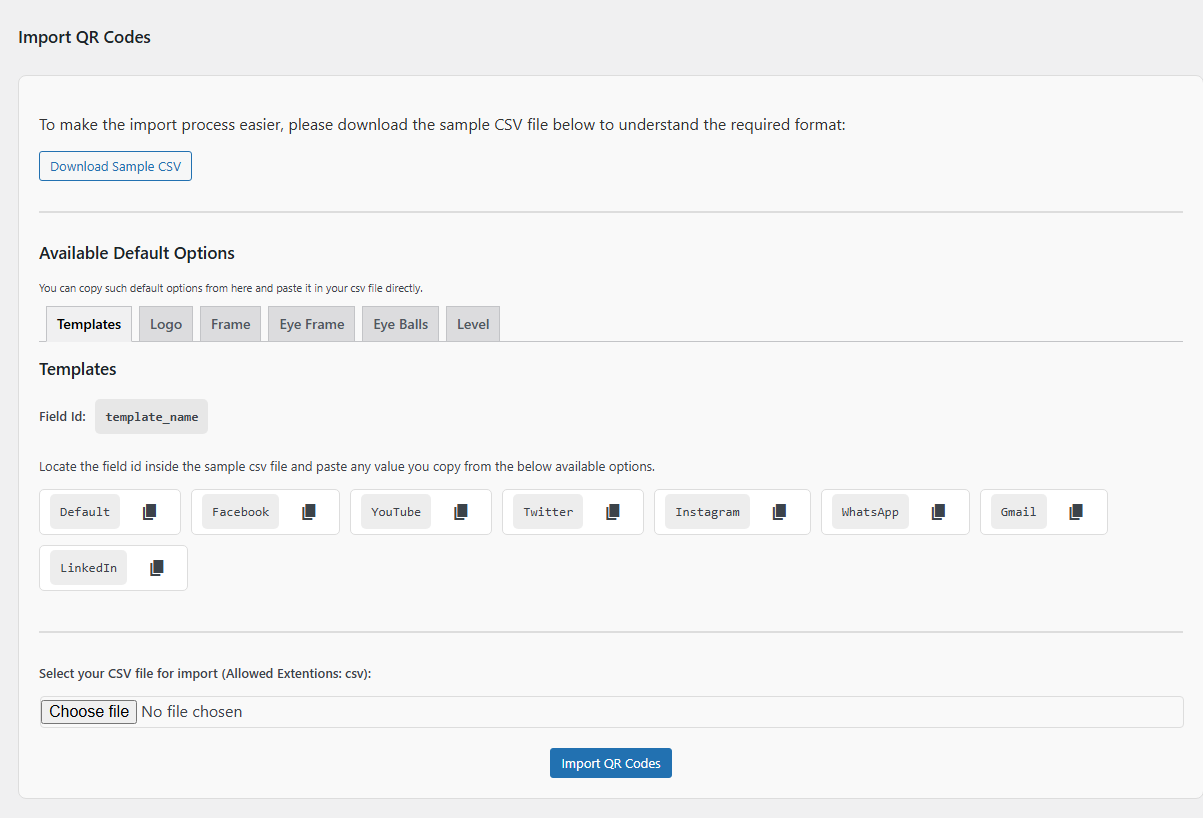
6. Admin Interface: Import QR Code Feature with Sample CSV File
We have added a sample CSV file to enhance user understanding and streamline the import process for QR codes.
7. Basic Introduction of the plugin.
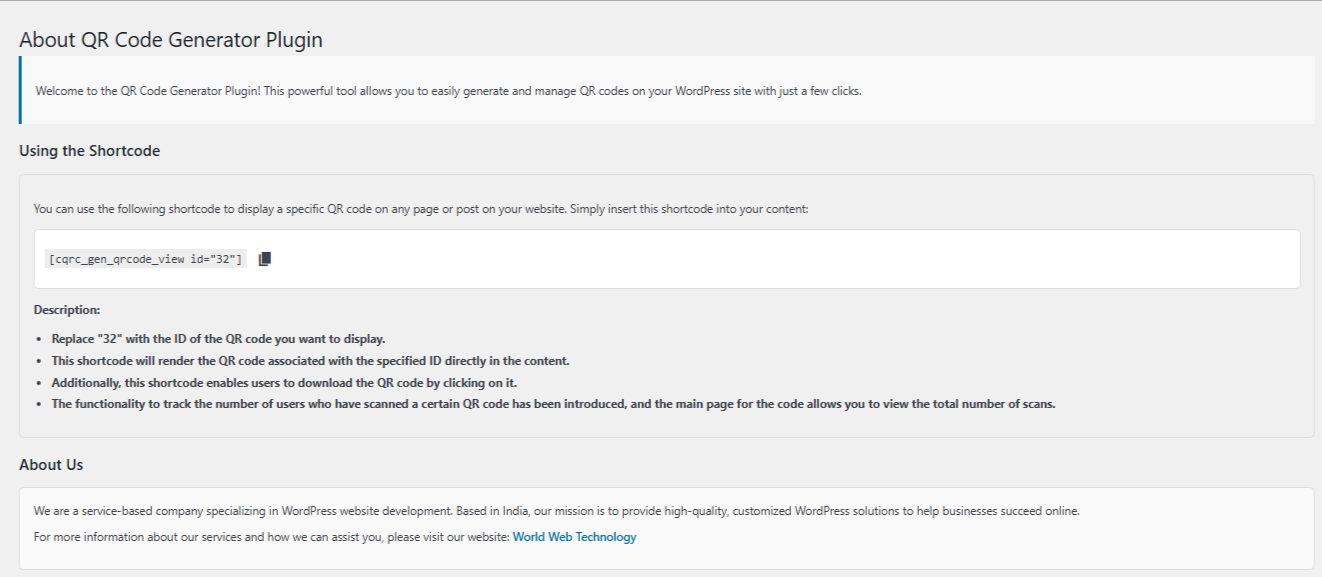
Demo Shortcode :-
[cqrc_gen_qrcode_view id=”32″]
Description:
- Replace “32” with the ID of the QR code you want to display.
- This shortcode will render the QR code associated with the specified ID directly in the content.
- Additionally, this shortcode enables users to download the QR code by clicking on it.
- The functionality to track the number of users who have scanned a certain QR code has been introduced, and the main page for the code allows you to view the total number of scans.
8. Frontend View of the Shortcode with Download QR Code Buttons
Below is the QR code generated Image show using the shortcode:
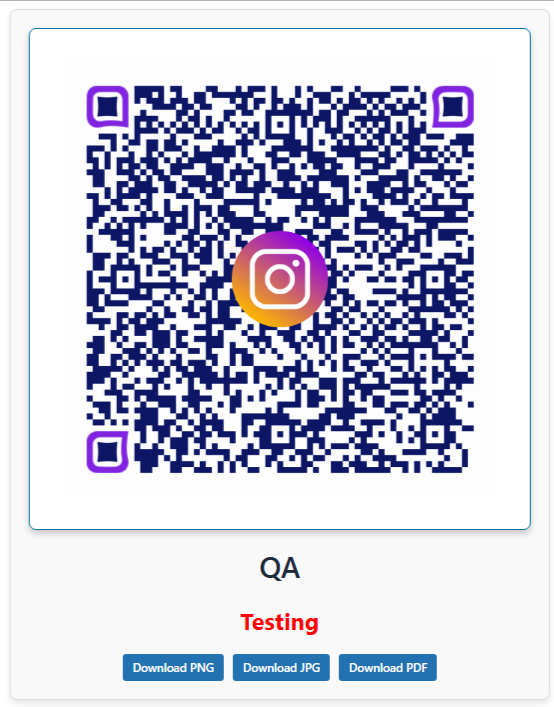
QR Code is Ready :- To use the QR code, scan it with a QR code reader or mobile device. Simply point your camera at the code and follow the instructions that appear.
Downlaod Features :- You can download the QR code in various formats. Choose the one that best suits your needs.
9. Instructions for Uninstalling the Plugin
Removal of QR Code Media :- The plugin retrieves all QR code entries from the qrcode generator table. For each QR code, it searches for associated media attachments in the WordPress media library where the guid matches the QR code value. All matching media attachments are permanently deleted from the database.
Database Cleanup :- The plugin drops the qrcode generator table and the qrcode insights table from the WordPress database. This step ensures that all plugin-specific data is removed and no residual tables are left behind.
Troubleshooting
- Plugin Not Appearing: Ensure that the plugin is correctly installed and activated. Check for compatibility issues with your platform.
QR Code Not Generating: Verify that the input data is correctly formatted and that required settings are properly configured. - Error Messages: Refer to the error logs for details and consult the support resources or community forums if needed.
FAQs
The plugin currently supports JPG, PNG, PDF format for QR code output.
Use the provided shortcode code to insert the QR code into your web pages.
QR codes can store a substantial amount of data, but larger amounts of data may lead to more complex QR codes that are harder to scan. The plugin typically handles standard data sizes, but check the documentation for any specific limits.
The security of the data encoded in a QR code depends on how the QR code is used and shared. The QR code itself does not encrypt the data, so if sensitive information is encoded, consider using additional encryption methods or secure channels.
Yes, the plugin supports generating QR codes in bulk.
The plugin may allow customization of color and size, but more advanced styling options such as adding logos or changing shapes may require additional plugins or custom development.
Yes, the plugin provides basic tracking capabilities for QR code scans. Specifically, you can track the number of times each QR code is scanned.
Check the plugin’s official website or repository for updates. Follow the update instructions provided, which usually involve downloading the latest version and replacing the existing files.
For help, refer to the plugin’s support page, consult the user forums, or contact the support team via email or through the platform’s support channels.
Have a look at demo
You can view a demo from here: Custom QRCode Generator Plugin